
New update! Service & Maintenance + significantly more technical data are now available in WrenchLane.
To further simplify your work, we have integrated more OEM data from Infopro Digital Automotive into the service and built a new workflow for service, maintenance, and technical data—directly linked to your selected vehicle.
OEM data is available to everyone until May 20th. After that, a paid subscription will be required. Diagnostics will continue to be included in your free subscription.
What’s New?
Service & Maintenance
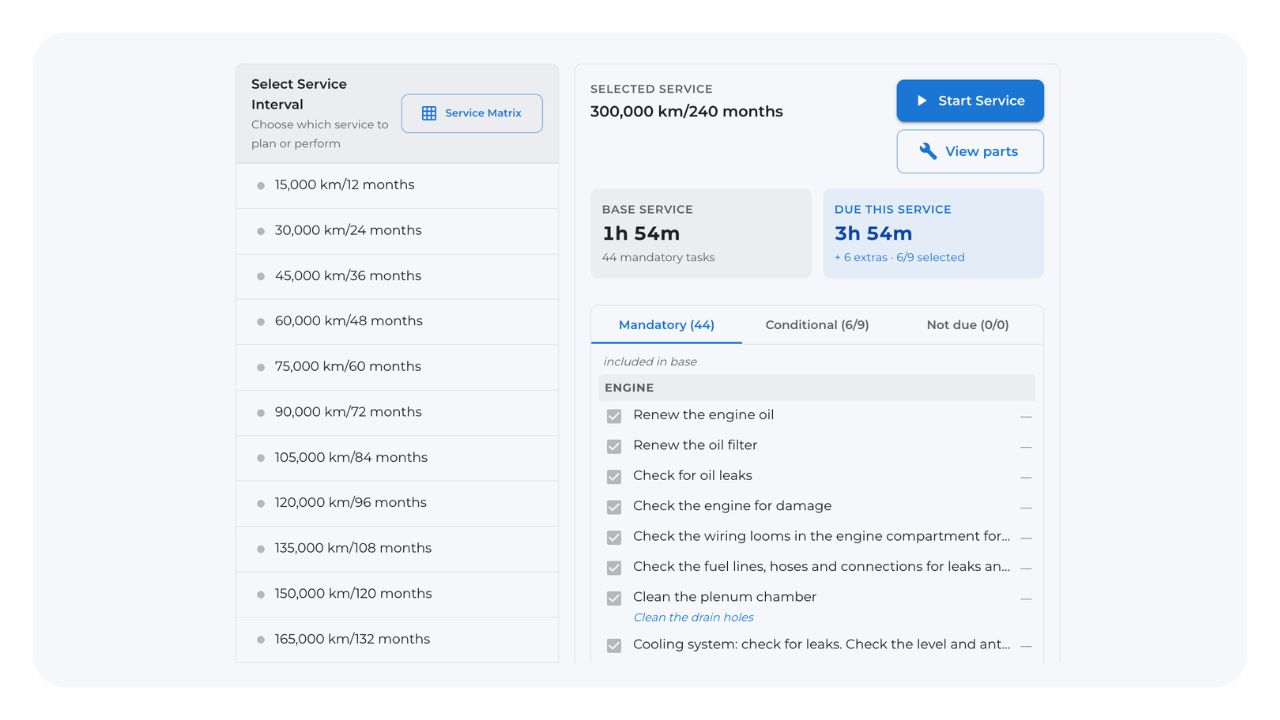
Select the "Service & Maintenance" option after choosing a car. Here, you can plan and perform vehicle service, all according to OEM specifications.
You can select a service in two ways:
- Select Service Interval: Choose service based on kilometers or months specific to the car model.
- Via "Suggest": Enter the manufacturing month and mileage, and we will suggest the appropriate service.
You can also check out our new Service Matrix.
Want to add a specific service step? It’s easy—just click on "Conditional."
By clicking "View parts," you can see which parts are needed for the selected service. When you then click "Start Service," WrenchLane guides you step-by-step through what needs to be done or checked. This includes several stages, providing information such as:
- Oil capacity
- Tightening torques
- Checks and work steps
When you are finished, you can also choose to print the service protocol.
Expanded Information Under Technical Data
Previous updates included Technical Data such as:
- Specifications
- Repair times
Now you can also find:
- Technical Drawings
- Repair Manuals
- Wiring Diagrams
- And more OEM information
See the video
https://youtu.be/VHoAFbe0nVM