
AI diagnostics for mechanics — free
Diagnose fault codes, symptoms and complex vehicle problems with WrenchLane.
No credit card, no trial clock. Every day you get a full AI diagnostic, chat, AI searches and Ask WrenchLane questions — with TSB search and diagnostic reports included.
$0. No credit card required.
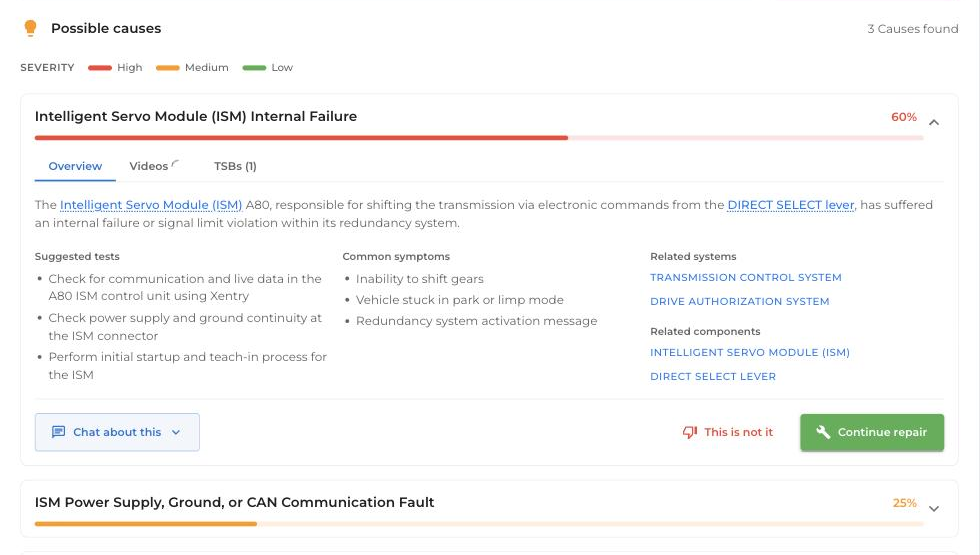
Free, every day
What you can do for free.
WrenchLane Free is a working diagnostic tool — these are yours every day, on any car.
01Diagnose codes and symptoms.
1 full AI diagnostic a day: fault codes and symptoms in, ranked causes with likelihood and severity out.
02Ask in plain language.
3 Ask WrenchLane questions and 10 AI searches a day — sourced, cited answers instead of forum digging.
03Search TSBs.
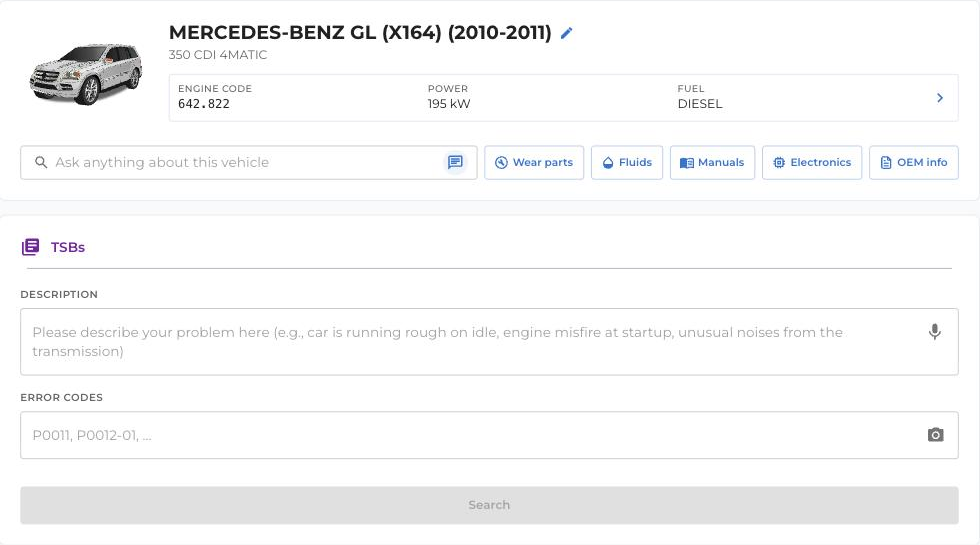
Find technical service bulletins for the exact vehicle and symptom you're looking at.
04Keep your reports.
Diagnostic reports and your last 5 ongoing diagnostics stay saved in your garage.
Start the job
Snap a photo. We'll read the codes.
Already pulled DTCs with your OBD reader? Skip the typing. Take a photo of the reader's screen and WrenchLane reads the codes — add the symptoms by typing or speaking, and the diagnosis starts. Or enter codes manually if you prefer.
The workflow
From code to clear next step.
The free plan follows the same diagnostic flow the workshop plans use.
01Enter what you've got.
Fault codes, symptoms or both — typed, spoken or from a photo of your OBD reader.
02Get ranked causes.
WrenchLane weighs likelihood and severity so you check the right thing first.
03Follow the next step.
Guided suggestions for what to verify and what the fix usually involves.
Coverage
Free forever, no card.
No trial countdown — the free plan stays free. Upgrade only when you need OEM depth on the cars you're fixing.
- 1 AI diagnostic a day
- 1 chat message a day
- 10 AI searches a day
- 3 Ask WrenchLane questions a day
- TSB search
- Diagnostic reports
- Last 5 ongoing diagnostics saved
- InfoPro demo data on 1 demo vehicle
- Runs in the browser — computer, tablet or phone
“We primarily use WrenchLane to troubleshoot complex diagnostics where there are multiple fault codes.”
Kamil — Bilverkstad i Nacka AB, Stockholm
Which plan
When you need more, upgrade.
Working deep on one car? WrenchLane ONE unlocks full OEM data for a single vehicle, from $5/month billed yearly. Running a workshop? Small gives small workshops premium data for 50 vehicles a month with multiple users, unlimited diagnostics and Ask WrenchLane. Everything you saved on Free comes with you.
FAQ
Questions worth answering before you start.
What does the Free plan include?
Each day: 1 diagnostic, 3 chat messages, 10 AI searches and 1 license plate lookup, plus TSB search, diagnostic reports, the 5 latest ongoing diagnostics in History and the demo vehicle. Free is for 1 user and shows AI-estimated values instead of premium technical data.
Learn more: Free (limited), Daily limits (diagnostics, chat, AI search, plate lookups)
Do I need a credit card to start?
No. Every new workshop starts on the Free plan without a card. You only add a card when you buy a paid plan.
Learn more: Free (limited), Sign up for free
When do the daily limits reset?
At midnight UTC, not local midnight. The limits are counted for the whole workshop, not per user.
Learn more: Daily limits (diagnostics, chat, AI search, plate lookups)
What happens when I reach a daily limit?
A preview opens that shows what upgrading adds, with an Upgrade button for admins and, where available, Open demo vehicle to try the feature on the demo car. Mechanics are asked to contact their workshop admin.
Learn more: Upgrade preview, Daily limits (diagnostics, chat, AI search, plate lookups)
Can I get higher limits for free?
Yes, once. Free workshops in European countries that complete the Get started checklist get 7 days of 10 diagnostics, 30 chat messages and 100 AI searches a day. It does not raise plate lookups or unlock premium data.
Learn more: Onboarding reward: 7 days of higher limits
How many chat messages can I send on the Free plan?
3 chat messages a day; One, Small and Large have no daily limit. The count resets at midnight UTC and is shared by the workshop.
Learn more: Daily AI limits on the free plan (chat, diagnostics, AI search), Daily limits (diagnostics, chat, AI search, plate lookups)
What is the demo vehicle?
Every plan can open one fully unlocked demo vehicle to see the premium data: a 2015 BMW X5 (F15) xDrive 25d in European countries and a 2018 Ford F-150 3.5L EcoBoost in North America. On the Start page, a banner above Select your vehicle says Try WrenchLane with this demo vehicle; click Try it. The F-150 needs the MOTOR end-user terms to be accepted.
Learn more: Try InfoPro free / Try Images & diagrams free (demo vehicle)
Do I have to type the codes from my scan tool?
No. Click the camera button next to Error codes and take or choose a photo (JPEG or PNG) of the scan tool's screen; WrenchLane reads the codes and their descriptions into the form. You can also speak them with the microphone.
Learn more: OBD reader photo scan (fault codes from a photo), Voice input for the problem description
Ready to diagnose smarter?
Start free — no credit card, no clock. Your first diagnosis is minutes away.