
Built for independent workshops
From fault code to completed repair in one workflow.
WrenchLane combines AI diagnostics, OEM technical data, wiring diagrams, repair instructions and labour times — so technicians spend less time searching and more time fixing cars.
$79/month
or $58/mo billed yearly — save 26%
$79/month, billed today. Cancel anytime.
What you get
Everything a small workshop needs.
WrenchLane Small covers the whole job — diagnosis, verification, repair data and labour times — for small workshops.
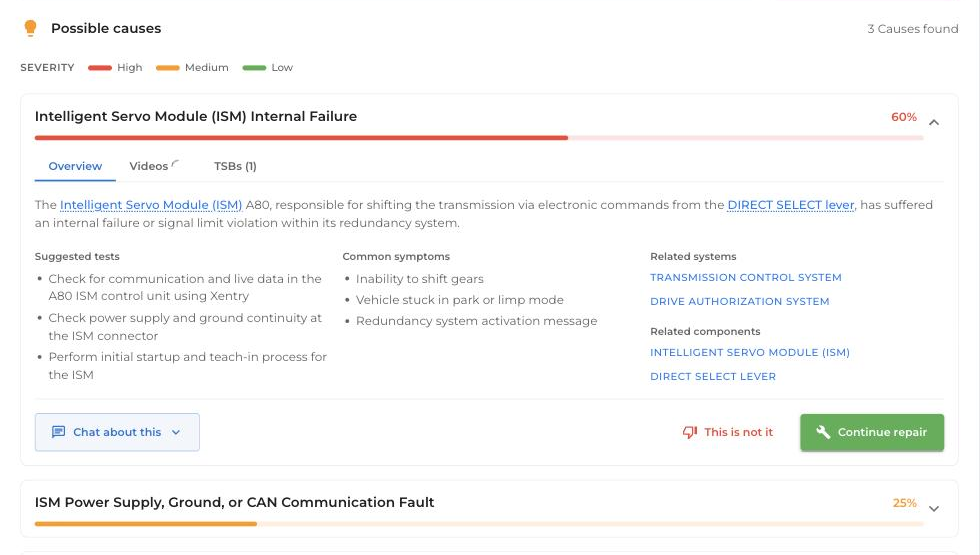
01Ranked causes, not guesses.
Fault codes and symptoms go in. Ranked causes with likelihood and severity come out.
02OEM technical data.
Torques, clearances, capacities, repair times and wiring diagrams — powered by Infopro Digital, not a forum's best guess.
03Unlimited AI search and Ask WrenchLane.
Ask in plain language and get sourced, cited answers from this vehicle's data — and beyond it.
04Built for the whole team.
Up to 11 users included, each with their own login.
Pricing
$79/month. Everything included.
Or $58/month billed yearly ($699/year — save 26%). Multiple users, premium data for 50 vehicles a month, verified measurements, unlimited AI search and Ask WrenchLane, priority support. Billed from day one.
Start the job
Snap a photo. We'll read the codes.
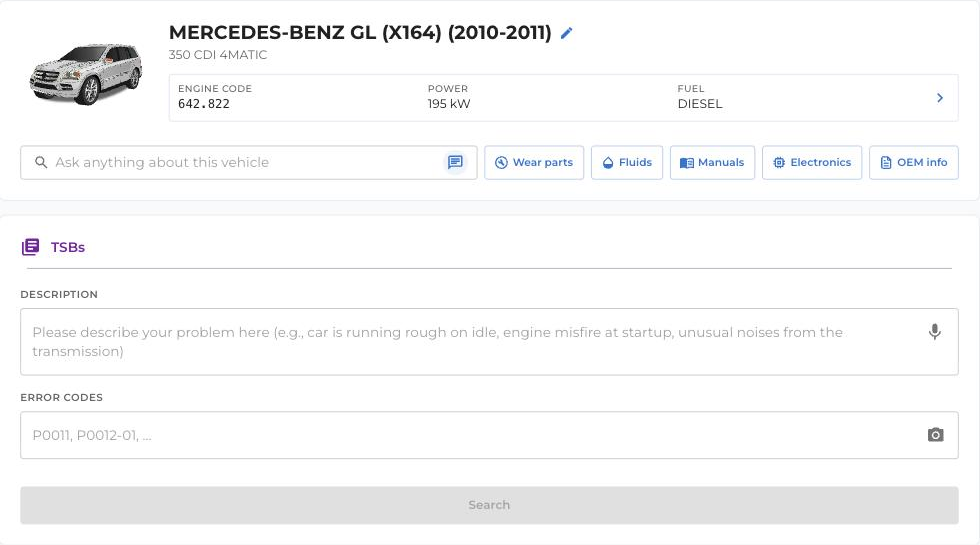
Already pulled DTCs with your OBD reader? Skip the typing. Take a photo of the reader's screen and WrenchLane reads the codes — add the symptoms by typing or speaking, and the diagnosis starts. Or enter codes manually if you prefer.
The workflow
From fault code to completed repair.
WrenchLane follows the same order your technicians already work in.
01Diagnose.
Enter fault codes and symptoms — typed, spoken or from a photo. WrenchLane returns ranked causes with likelihood and severity.
02Verify.
Check the suspect component with guided measurements, pin values and the wiring diagram for that exact vehicle.
03Repair.
Confirm the cause and follow OEM repair instructions step by step, with a time estimate for every step.
04Build the job.
Add parts, fluids and OEM labour times as you work, then finish the job as a report or invoice.
05Save the vehicle.
Diagnosis, repair and history stay on the car — the next visit starts where the last one ended.
Coverage
OEM-grade depth on every job.
Small unlocks premium data for 50 vehicles a month — and keeps diagnostics, chat and AI search unlimited on every car that rolls in.
- OEM wiring diagrams and technical drawings
- Adjustments — torques, clearances, capacities
- OEM repair times
- Wear parts intervals
- Fluids and lubricants
- Service and maintenance schedules
- Verified measurements
- Full garage history — every fix, every reading
- Unlimited diagnostics, AI search and Ask WrenchLane
“We primarily use WrenchLane to troubleshoot complex diagnostics where there are multiple fault codes.”
Kamil — Bilverkstad i Nacka AB, Stockholm
Which plan
Small sits in the middle of the range.
Working on a single car? WrenchLane ONE unlocks full depth for one vehicle, from $5/month billed yearly. Running 3–10 technicians? WrenchLane Large adds capacity for 200 premium vehicles a month with shared access for the whole floor. Switch tiers whenever — your vehicles and history come with you.
FAQ
Questions worth answering before you start.
What is the difference between Small and Large?
How many users can my workshop have?
Free and One have 1 user. Small and Large have up to 11 users each.
Learn more: Manage team (add mechanics, roles), Small, Large
How do I add a mechanic?
As admin, go to Menu, Profile, Team, Manage team and click Add user. Enter a username, an optional email, the role and a password, click Create, and give the login details to your colleague; there is no email invitation.
Learn more: Manage team (add mechanics, roles)
Where does the technical data come from?
In European countries the technical data is InfoPro data from Infopro Digital Automotive, the team behind HaynesPro. In the US, Canada and Mexico, Images & diagrams come from MOTOR.
Learn more: InfoPro availability by country
What equipment do I need?
A computer, tablet or phone with an internet connection, in the browser or in the WrenchLane app. You keep your own OBD reader: type the codes, say them, or take a photo of the reader's screen.
Learn more: OBD reader photo scan (fault codes from a photo), WrenchLane app for iPhone, iPad and Android
Do I need a credit card to start?
No. Every new workshop starts on the Free plan without a card. You only add a card when you buy a paid plan.
Learn more: Free (limited), Sign up for free
Can I switch to another plan?
Yes. In Plan & billing click Change plan and Switch plan on the plan you want, then confirm. A change that takes effect later is shown with its date and can be undone with Cancel scheduled change; switching is blocked if your team is larger than the new plan allows.
Learn more: Switch plan (and scheduled plan changes)
Ready to diagnose smarter?
Get started with Small — from fault code to completed repair in one workflow.
WrenchLane Small
$79/mo · Cancel anytime